Replay the race you just sailed.
Watch the race unfold boat by boat. See the starts, splits, crosses, shifts, roundings and gains that were hard to judge while you were sailing.
Use tracks from the Android app, Garmin, Apple Watch, Sailmon, Vakaros or other GPS devices.
Memory misses the moments that changed the race.
After racing, everyone has a version of what happened. The replay gives the fleet a shared view: where the gap opened, who gained on the beat, which rounding cost distance, and whether the left side really paid.
See the moments where boats separated, crossed or lost touch.
Compare routes, sides of the course and decisions against the fleet.
Turn the replay into a practical focus for your next race or training session.
See the race from above, not just from your cockpit.
Watch the boats move together, follow the tracks they actually sailed, and add the context that makes the replay useful: wind, marks, segments and stats.
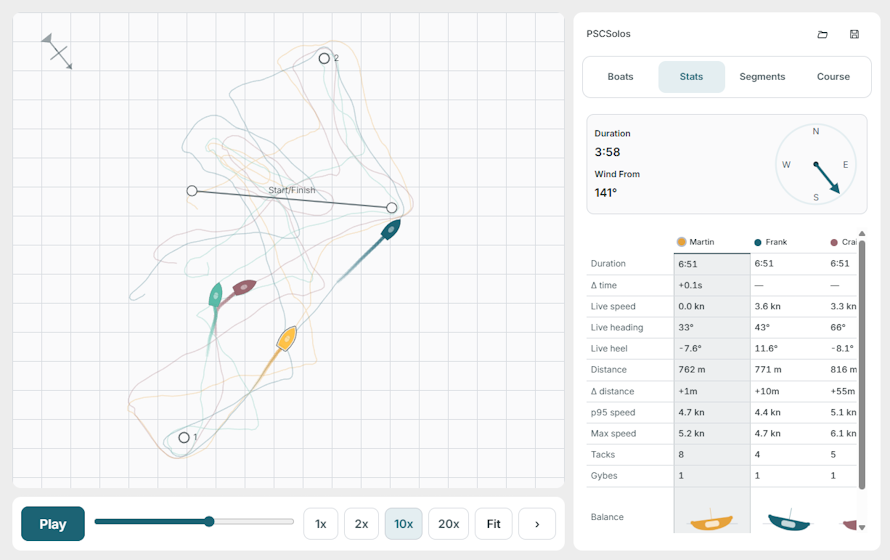
Compare your race with the boats around you.
Replay works best when sailors compare moments, not just results. See how another boat started, where they tacked, how they rounded the mark, or how they kept speed through a shift.
Two boats leave the line together. One holds a lane. One spends the first beat recovering.
One boat protects the middle. Another commits to a side. Replay shows where the gain appeared.
A small rounding loss can become a long lane problem. Replay makes it visible.
Compare different dinghies without pretending they are the same.
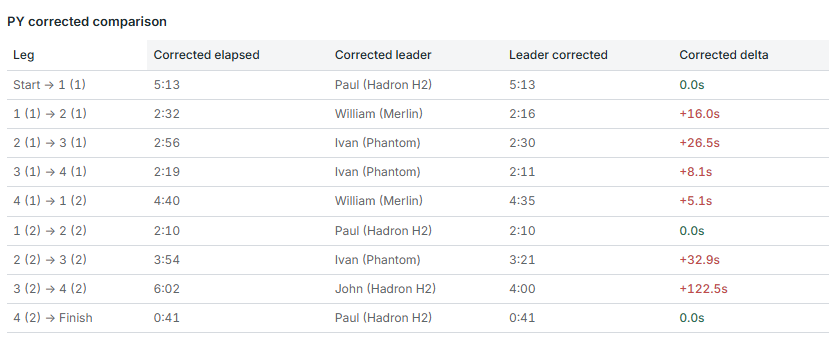
Club races often include Solos, Lasers, Aeros, Toppers, Teras and other classes on the same course. Dinghy Coach can use PY numbers to help compare mixed-fleet performances, so the replay is not just about who was fastest on the water.
Compare boats with PY context instead of treating every dinghy as identical.
Review performance after handicap correction, not only raw finish order.
Give mixed fleets a clearer way to discuss who sailed well and where the race changed.
Use the replay to choose what to improve.
The replay is not there to prove someone was right. It helps sailors find the next useful thing to work on: starts, lane holding, tack timing, mark roundings, boat speed, positioning or decision-making.
The aim is not to watch the race again. The aim is to leave with one clear thing to work on next time.
Did you win space, accelerate cleanly and hold your lane?
Did you sail the lifted tack, protect the right area or overstand?
Did manoeuvres cost distance or break rhythm?
Did you exit cleanly or lose speed and position?
Did angles, pressure or positioning change the leg?
Did one mistake decide the race, or did small losses build up?
Already recording? Upload the track you have.
Dinghy Coach works with common GPS track files and sailing devices. You do not need every sailor using the same hardware.
From race to debrief in minutes.
Upload files or open tracks already recorded with Dinghy Coach.
Watch the race unfold with boats, trails and timing aligned.
Add marks, wind, lines or segments where useful.
Use the replay to agree what happened and what to work on next.
Open the race. See the moments. Improve with purpose.
Start with one track, one race or one comparison.
Use the optional Android app to record on the water.